2026
Multi-Tenant Revenue & Billing Platform
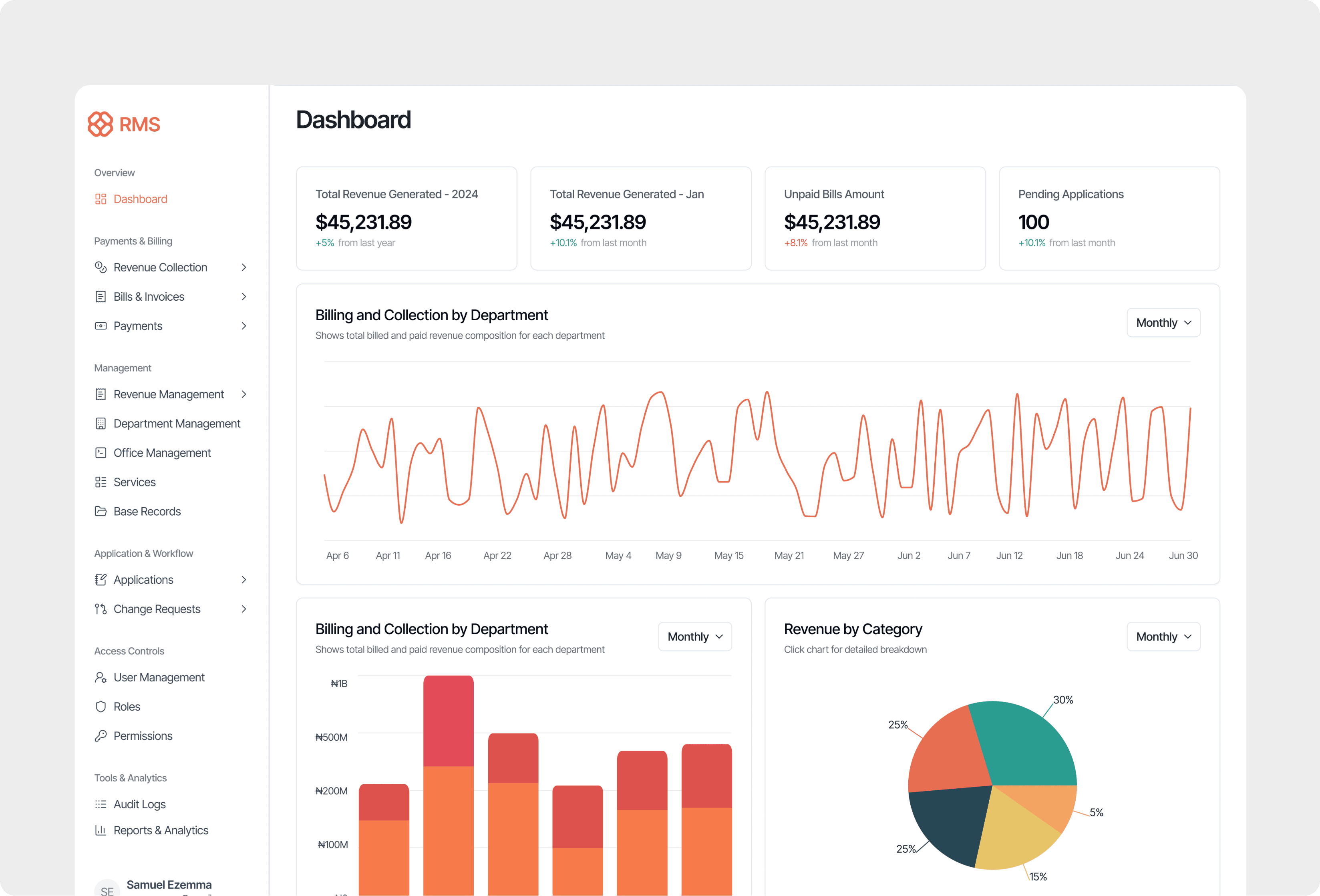
Context & Problem Space
Revenue management in the agency sector is a high-stakes, high-complexity domain. Agencies process payments across multiple gateways and navigate complex regulatory frameworks, yet most rely on spreadsheets and email chains to reconcile billions in transaction volume. A single month-end close can take two weeks, and discrepancies often go undetected until they become compliance violations.
The core pain points were:
Core Pain Points
- Disconnected operations — Revenue management was spread across independent agencies and departments, each using its own processes, billing rules, and spreadsheets. This created fragmented data, inconsistent calculations, and no shared operational standard.
- Manual and error-prone workflows — Billing, reconciliation, and approvals relied heavily on spreadsheets, CSV exports, emails, and manual calculations, resulting in frequent errors, slow processing, and delayed revenue collection.
- Limited visibility and accountability — Finance teams lacked a centralized view of billing, payments, and outstanding revenue. Bills could disappear during approval, audit trails were incomplete, and tracking revenue from issuance to payment was difficult.
- Compliance and governance risks — Scattered records, inconsistent documentation, and weak data separation between agencies made audits more difficult and increased operational and regulatory risk.
- Poor scalability — As transaction volumes and the number of participating agencies increased, the manual processes became increasingly inefficient, making it difficult to maintain accuracy, speed, and operational control.
The Design Challenge
Design a unified digital ecosystem that:
- Digitizes all billing and revenue operations
- Allows each agency to operate autonomously within their unique business rules
- Provides central visibility and governance
- Eliminates manual errors and creates full audit trails
- Scales to support diverse agencies with different services, workflows, and regulations
My Role & Approach
Sole Designer in Cross-Functional Team
As the only product designer embedded with a tech consulting delivery team, I led all design activities while collaborating closely with:
- Business Analyst — Documenting existing processes and business rules
- Product Manager — Prioritizing features and stakeholder needs
- Engineering Team — Ensuring technical feasibility
- Project Manager — Managing timelines and deliverables
- QA Team — Validating designs during testing
My Responsibilities
- Led discovery workshops with internal teams and client stakeholders
- Mapped complex workflows and business logic into structured user flows
- Designed end-to-end experiences for 4 interconnected platforms
- Created wireframes, high-fidelity UI, and component systems
- Facilitated alignment between BA documentation, PM priorities, and engineering constraints
- Delivered interaction specs and developer handoff documentation
- Iterated through testing cycles based on user and stakeholder feedback
Design Approach
- Discovery First — Spent significant time understanding existing manual processes, pain points, and business rules before designing solutions
- Systems Thinking — Designed for the ecosystem, not individual screens — ensuring data flows seamlessly across platforms
- Progressive Complexity — Built defaults for 80% use cases while supporting advanced configurations for the remaining 20%
- Collaboration as Design — Facilitated decision-making across stakeholders with different perspectives (BA wanted comprehensiveness, PM wanted speed, Engineering wanted feasibility)
The Solution: A Multi-Tenant Architecture
The foundational decision was building around true multi-tenancy — not just visual separation, but complete data, workflow, and configuration isolation per agency. This architectural choice shaped every design decision downstream.
What Multi-Tenancy Means
- Each agency operates in its own isolated environment
- Configuration, workflows, and data never leak between tenants
- Administrators can manage multiple agencies from a single control plane
- New agencies onboard without affecting existing tenants
- Compliance and audit requirements are enforced per-tenant
It feels like: A single, unified platform that adapts to each agency's needs. It actually is: A sophisticated isolation architecture where every data point, workflow, and configuration is scoped to a tenant.
Core Modules I Designed
-
Tenant Management — Agency creation, configuration, and lifecycle management
- Agency profile setup with branding, contact, and compliance details
- Tenant-level configuration for workflows, permissions, and integrations
- Onboarding wizard for new agencies with guided setup
-
Services Engine — Dynamic form and service configuration per tenant
- Drag-and-drop form builder for custom service definitions
- Formula builder for rate calculations and pricing rules
- Bulk bill generation with category-specific targeting
-
Bill Generation — Single and bulk bill creation with validation
- Single bill creation with validation
- Bulk billing with category-based targeting
- Conflict detection and safety confirmations
- Bill status management (pending, issued, paid, withdrawn)
-
Approval Workflows — Configurable multi-stage approval processes
- Visual workflow builder with stage transitions
- Timeline visualization showing approval history
- Ownership clarity at every stage with audit trails
-
Permissions Matrix — Granular role-based access control
- Roles × permissions grid with visual indicators
- Per-module, per-action granularity
- Tenant-scoped role definitions
-
Reconciliation Engine — Automated transaction matching and exception handling
- Real-time transaction matching across sources
- Exception queue with context-rich investigation tools
- Drill-down audit trails for every reconciliation decision
-
Reporting Dashboard — Real-time KPIs and operational visibility
- Configurable widget-based dashboard
- Revenue health metrics with trend analysis
- Agency-level and portfolio-level views
Key Design Challenges
True Multi-Tenancy Without Confusion
The Problem
The platform needed to support hundreds of agencies, each with their own data, workflows, and configurations — while giving central administrators a clear view across all tenants. The risk was that users could accidentally operate on the wrong agency's data, or that the multi-tenant architecture could leak into the UX in confusing ways.
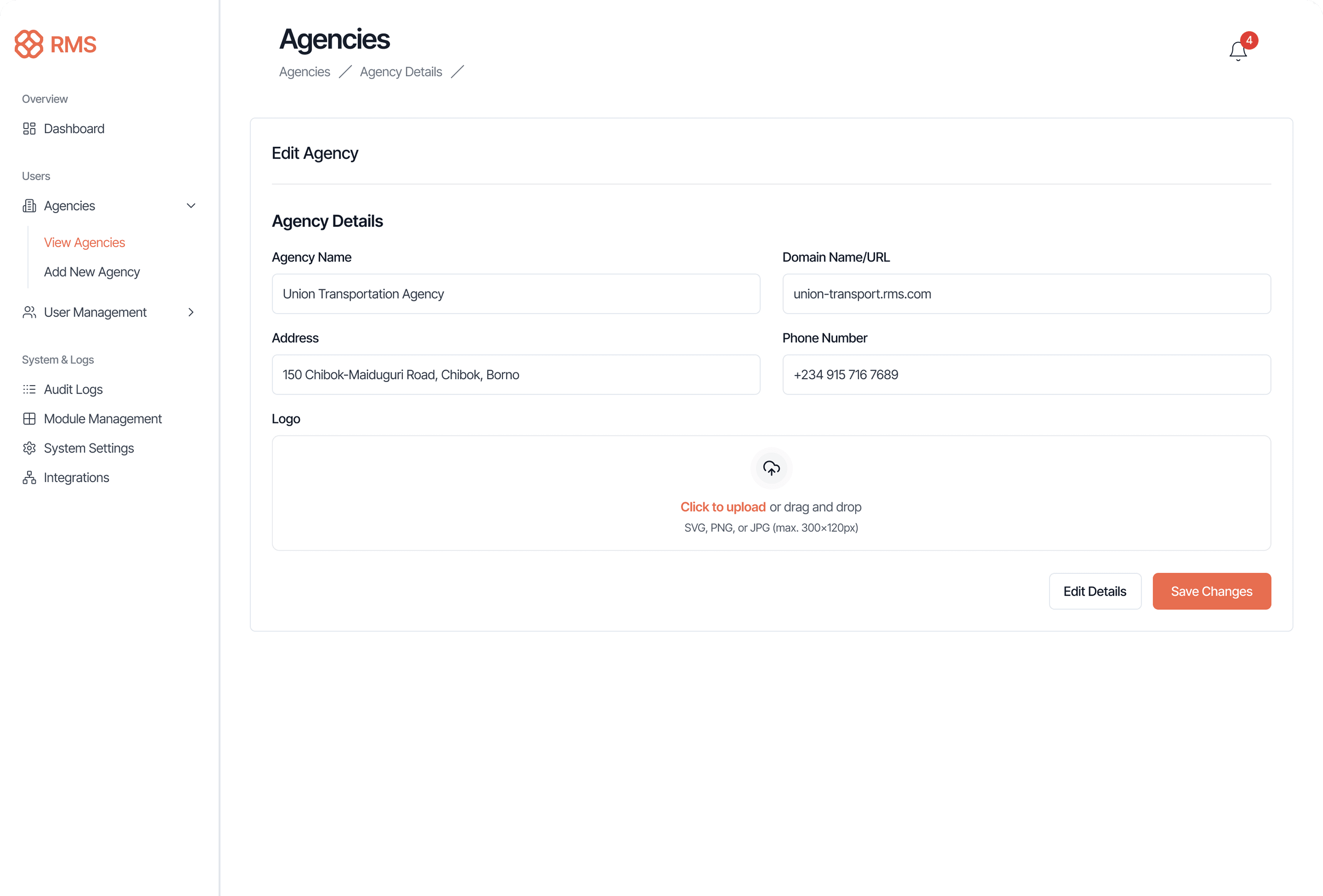
Design Solution
The solution was a three-layer context system:
- Global layer — Administrators see all agencies with search and filtering
- Agency layer — Once an agency is selected, the entire interface scopes to that tenant
- User layer — Individual users see only what their role permits within the scoped agency
Every screen includes a persistent agency indicator in the top bar, making the current context always visible. The design deliberately avoids hiding the multi-tenant nature — instead, it makes tenant context a first-class citizen of the UI.
Design Principle Applied
"Match system structure to user mental models." Users don't think "I'm a platform user" — they think "I work for the Transportation Agency." The architecture reflects that reality.
Transparent Approval Workflows
The Problem
Agencies had different approval chains (some 1-step, others 4+ steps). Manual processes created bottlenecks with no visibility into where applications stalled or who was responsible.
Discovery Insight
During interviews, "Where is this bill stuck?" was the #1 complaint. Applications disappeared into queues for weeks with no accountability.
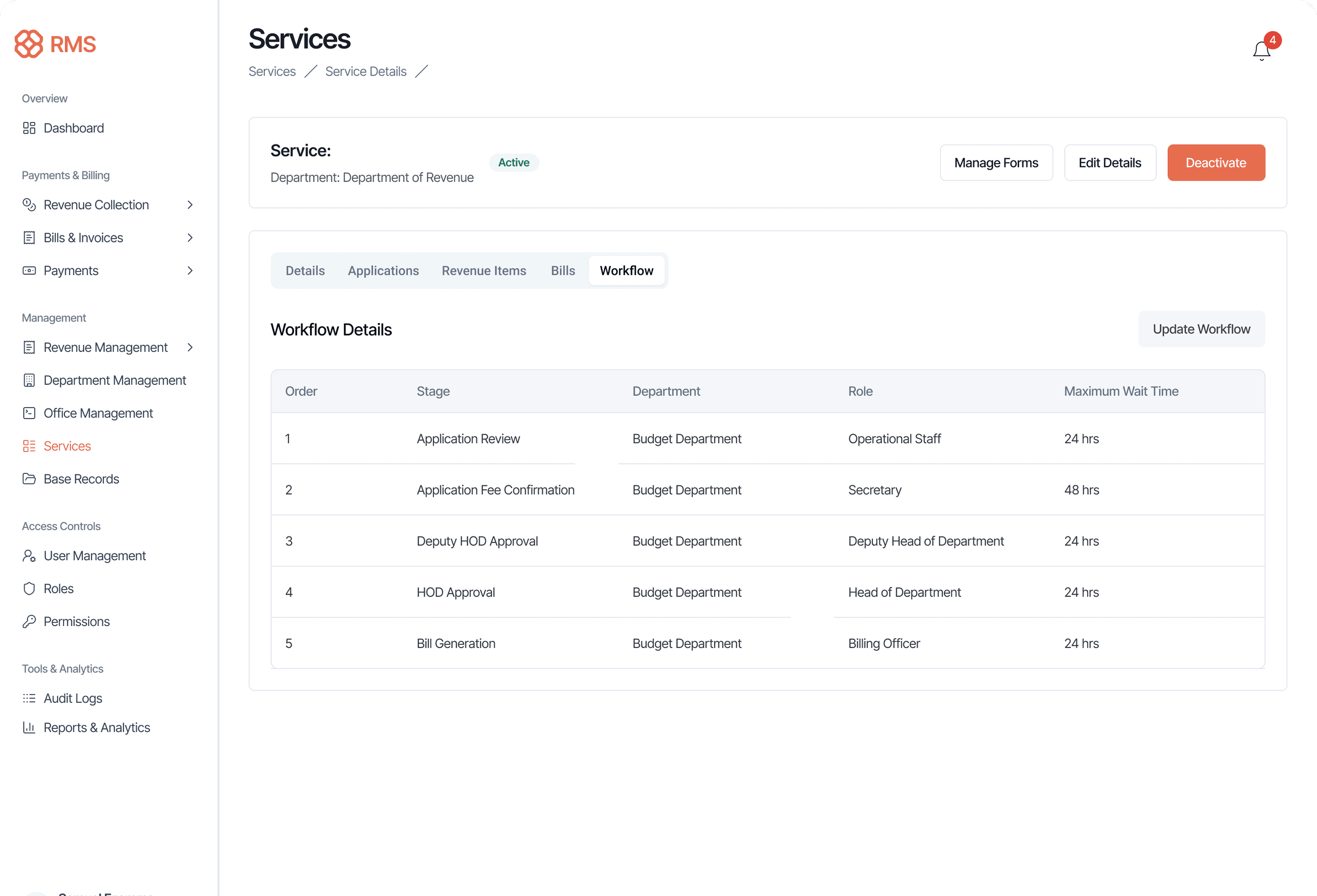
Design Solution: Configurable Workflow Engine
Each agency defines their approval chain:
- Number of stages (2-step, 3-step, or direct issuance)
- Departments/roles at each stage
- Maximum timeframes per step
Timeline Visualization
Every submission includes a visual timeline showing the complete approval history. Users can see at a glance where a submission is, how long it's been in each stage, and what actions have been taken. The timeline uses color coding to highlight bottlenecks and delays.
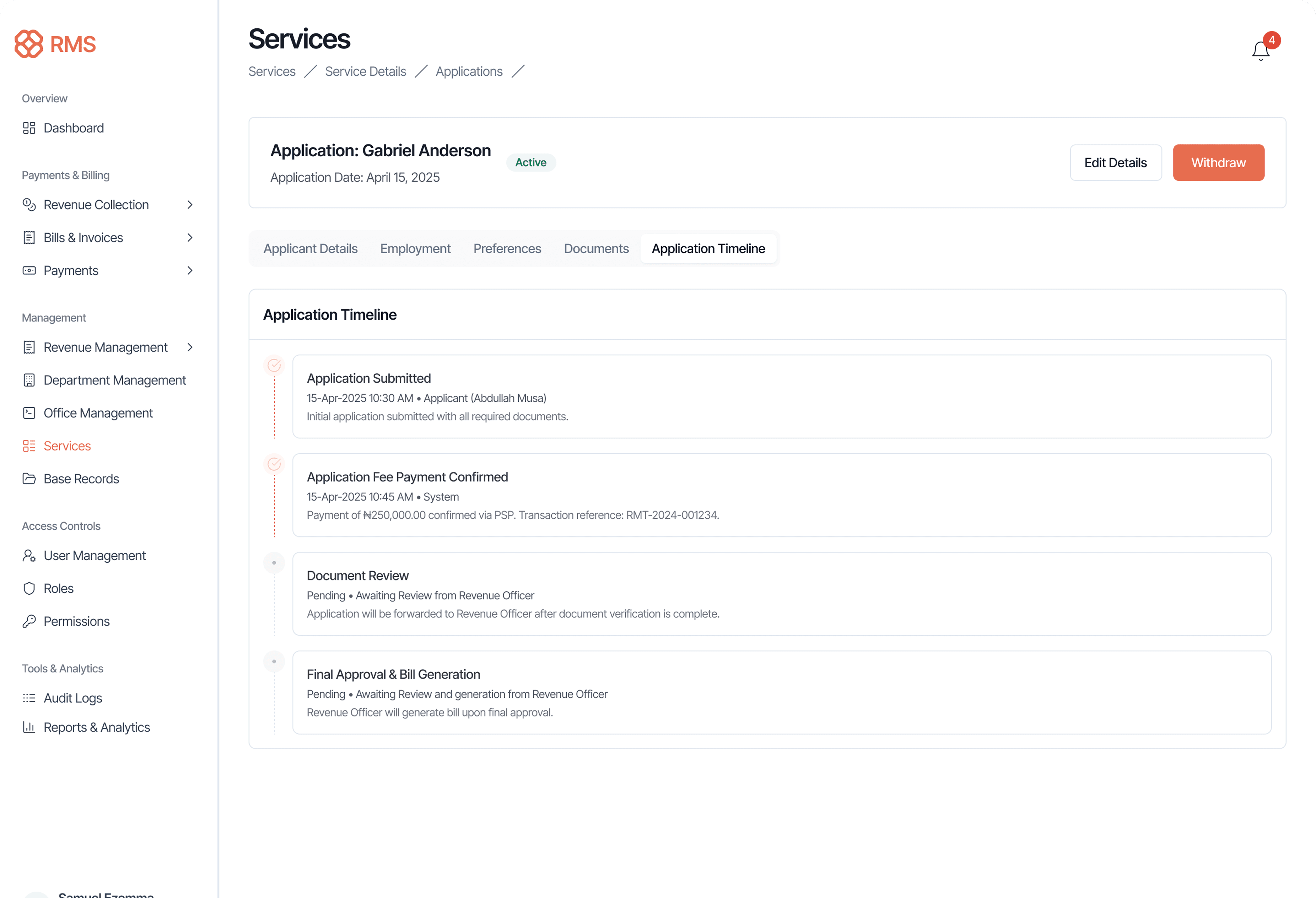
Ownership Clarity
Each stage in the workflow has a designated owner. The UI prominently displays who is responsible for the current action, when it was assigned, and any notes from previous reviewers. This eliminates the "who's handling this?" problem that plagued the email-based process.
Comprehensive Audit Trail
Every action in the workflow is logged with timestamps, user identity, and any notes or changes. This creates a complete audit trail that satisfies compliance requirements and provides context for future reviews.
Design Principle Applied
Transparency in workflows reduces friction and builds trust. When everyone can see the full picture, handoffs become smoother and accountability becomes natural rather than enforced.
The Services Engine — Most Complex
The Core Problem
Agencies had established fee calculation formulas done manually (Excel, calculators, paper forms). I needed to digitize these into a configurable system that non-technical users could manage independently.
The Complexity
Services drive everything: Revenue items → Calculations → Custom forms → Workflows → Bills.
Each agency had different formulas (fixed rates vs. calculated: base + (weight × rate)). Formula parameters needed to map to actual data sources (form fields, user records). One misconfiguration could break an entire billing cycle. Bulk billing could generate 10+ bills at once.
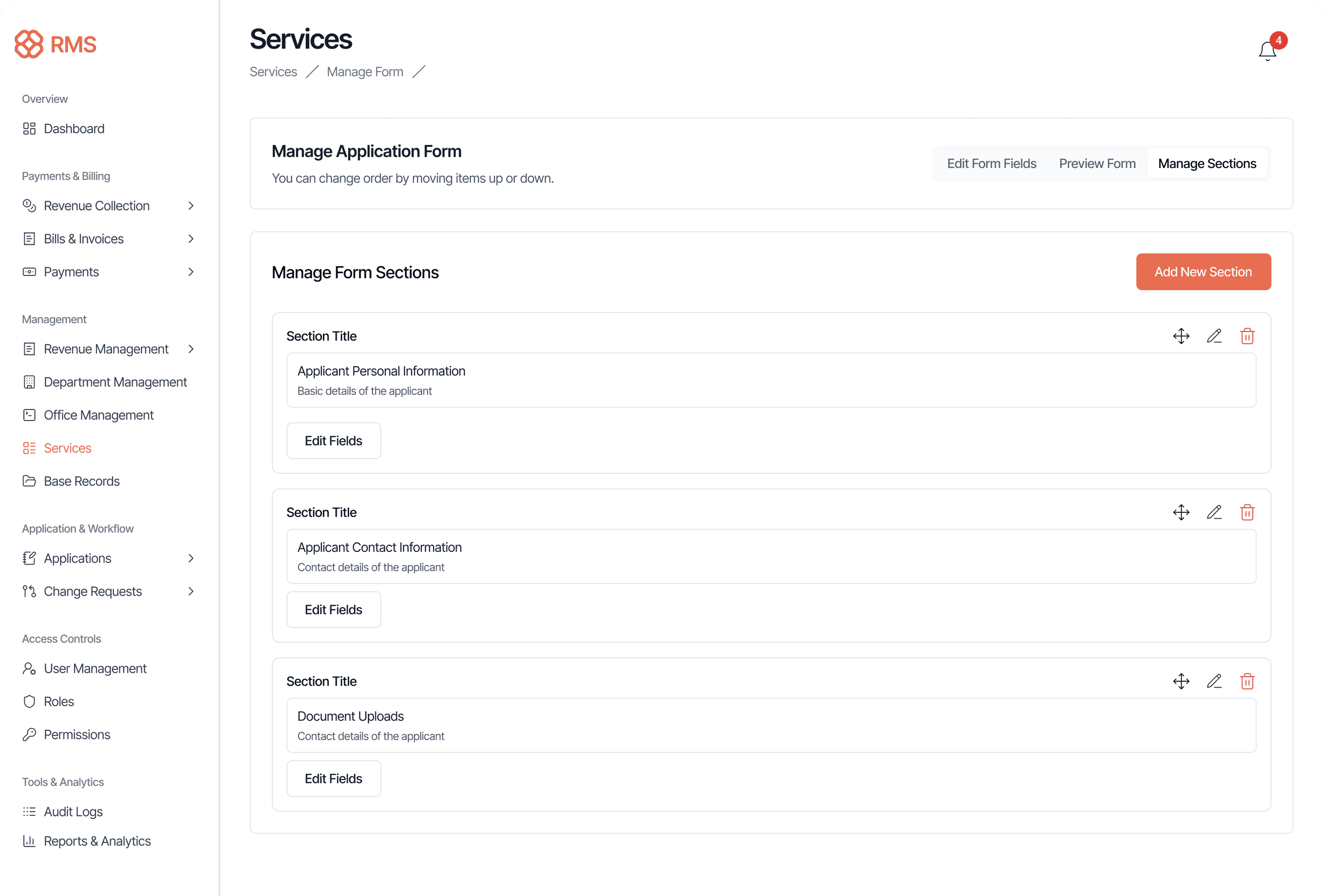
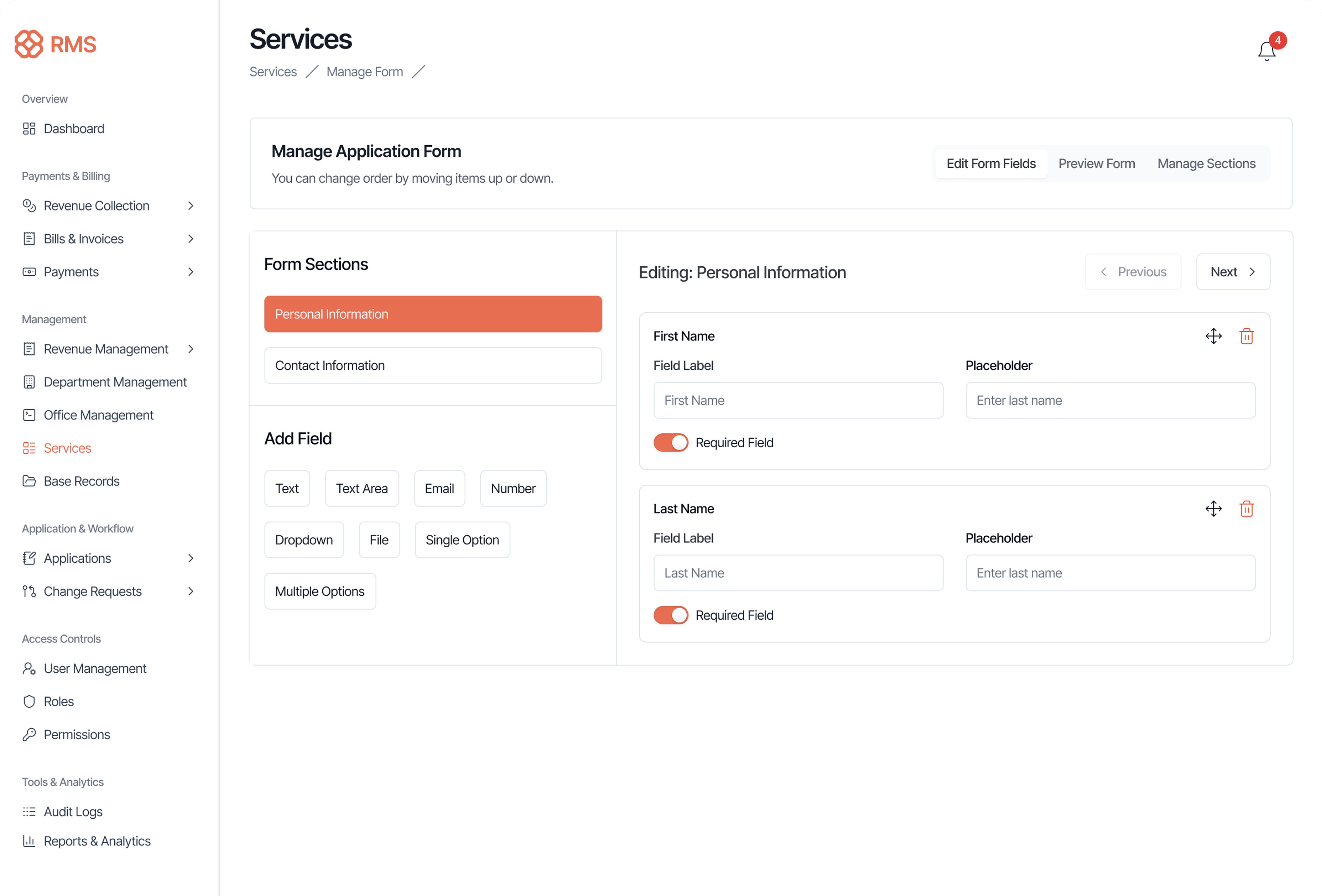
Design Solution: Three-Panel Progressive Workflow
Left Panel: Structure
- Pre-built section library (Personal Information, Contact Information)
- Drag-and-drop reordering
- Visual distinction between active/inactive sections
Center Panel: Field Library
- Button-based field type selection (Text, Email, Number, Dropdown, File, Multiple Options)
- All options visible at once, no dropdown menus
- One-click field addition
Right Panel: Live Configuration
- Field label and placeholder editing
- Required field toggle
- Delete with confirmation
- Real-time preview of changes
Impact: Non-technical users built 20+ field forms in under 30 minutes (vs. 2-3 weeks with developer support).
Part B: Formula Builder & Parameter Mapping
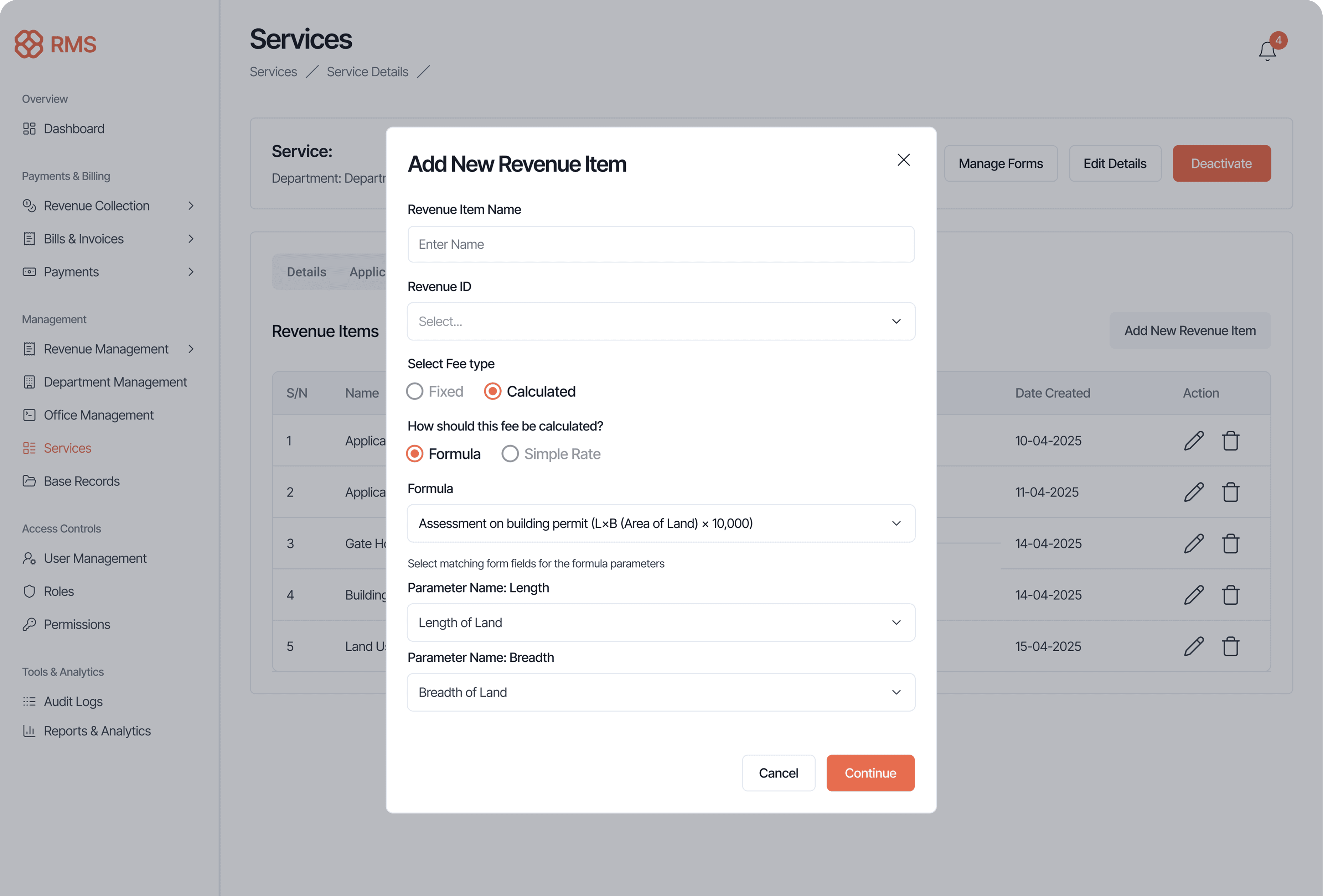
The Challenge: Translate agencies' existing manual formulas (e.g., "Vehicle fee = base (₦50) + weight in tons × ₦10") into configurable system logic.
Design Solution: Modal-Based Progressive Configuration
Broke complex formula creation into focused steps:
Step 1: Rate Type Selection
- Simple choice: Fixed Rate or Calculated Rate
Step 2: Parameter Selection
- Dropdown of available parameters (Vehicle Weight, Property Size, Duration, etc.)
Step 3: Formula Construction
- Visual builder with formula type selection and rate inputs
Design Principle Applied
"Guided power." Give users powerful tools wrapped in structured workflows—no open-ended complexity.
Part C: Bulk Billing with Safety Rails
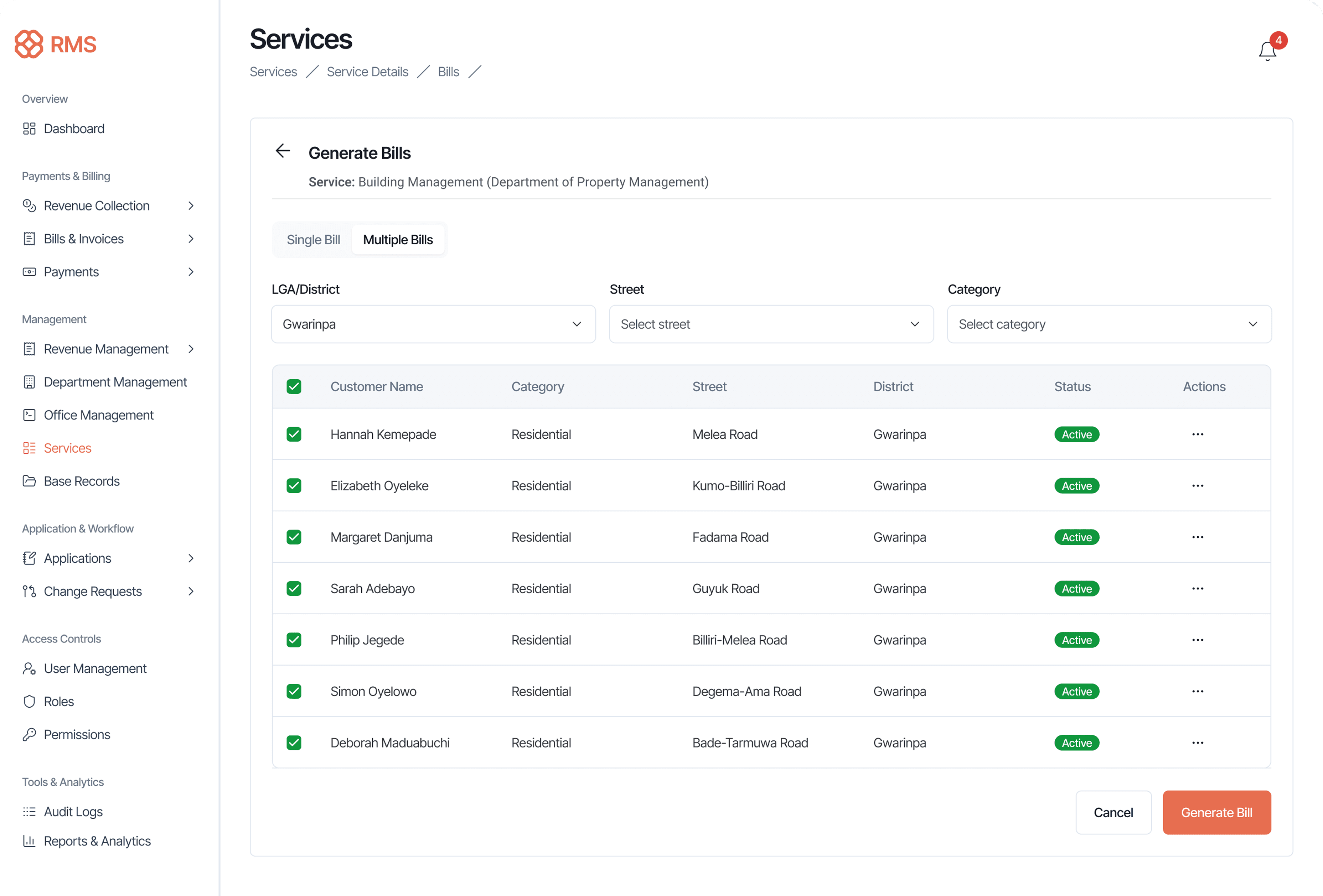
The Challenge: Generate multiple bills at once without errors, duplicates, or system crashes.
Design Solution: Category-Based Targeting with Preview
- Target selection: "All residential buildings in Gwarinpa district"
- Real-time count: "This will generate 47 bills"
- Conflict detection: "8 users already have active bills—exclude?"
Impact: Agencies now generate 1,000+ bills in minutes (vs. days of manual processing) with zero duplicate billing incidents.
Granular Permissions Management
The Problem
Enterprise systems require fine-grained access control, but permission matrices often become unwieldy and error-prone.
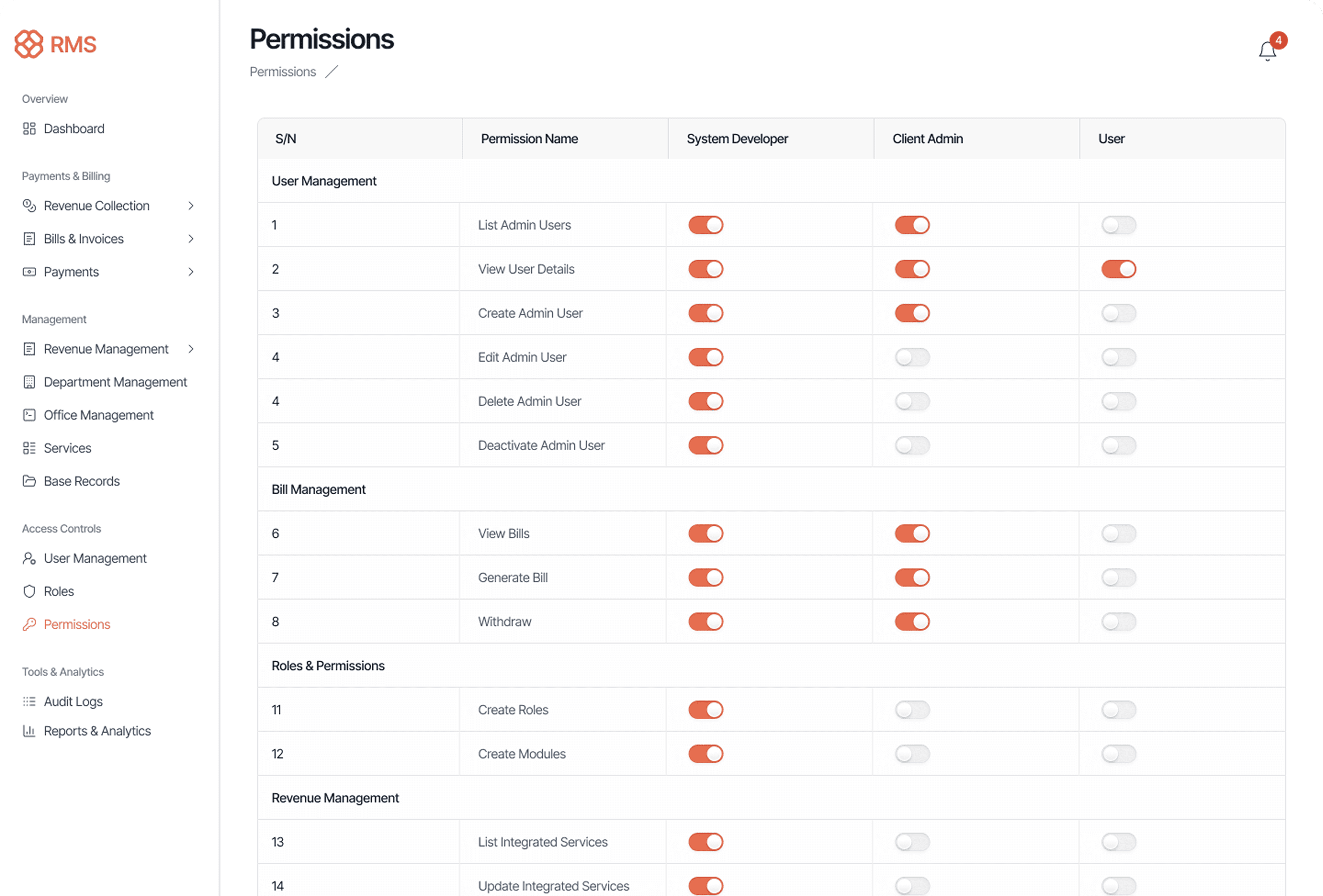
Design Solution: Structured Permission Matrix
Three-Tier Role Hierarchy:
- System Developer: Full platform control (used by consulting team during setup)
- Client Admin: Agency-level management (used by agency IT/finance leads)
- User: Operational access only (used by department staff)
Grouped by Functional Area: Permissions organized into logical sections:
- User Management (Create, Edit, Delete, Deactivate Admin Users)
- Bill Management (View, Generate, Withdraw Bills)
- Roles & Permissions (Create Roles, Create Modules)
- Revenue Management (Integrated Services, Search Categories)
Toggle-Based Controls:
- Instant visual feedback (orange = enabled, gray = disabled)
- No ambiguous checkbox states
- Each permission requires a deliberate click
Clear Naming Convention: Action-object pattern eliminates ambiguity:
- "Create Admin User" (clear)
Why This Design Works
- Audit-friendly: Security teams quickly scan what each role can do.
- Error prevention: Grouped permissions reduce chance of missing related controls.
- Self-documenting: New admins understand system capabilities by reviewing permission names.
- Scalable: Adding new permissions follows established pattern.
Impact: Role setup time reduced from 2-3 hours (with IT support) to 15 minutes (self-service by agency admins).
Outcomes & Impact
Process Efficiency
- Month-end close reduced from 14 days to 3 days
- Reconciliation time cut by 60% through automated matching
- Approval workflow processing speed increased by 40%
- Onboarding time for new agencies reduced from 2 weeks to 3 days
User Experience
- Error rates in reconciliation fell by 80%
- Support tickets related to navigation decreased by 35%
- User satisfaction scores improved from 3.2 to 4.6 out of 5
- Time spent on manual data entry reduced by 70%
Technical Achievement
- Zero data leaks between tenants across 18 months of operation
- 100% audit trail coverage for compliance requirements
- System scales from 10 to 500+ agencies without architectural changes
- 99.9% uptime for critical billing and reconciliation workflows
Key Learnings
Systems-Level Design Requires Facilitation
In consulting, design decisions aren't just about users—they're about building bridges between BA documentation needs, PM priorities, and engineering constraints.
Error Prevention > Error Handling
The time invested in validation (test calculators, conflict detection, required field toggles) prevented downstream disasters.
Defaults + Flexibility = Adoption
80% of agencies used default form sections with minimal customization, while the 20% with complex needs had the power they required.
Audit Trails Are Features, Not Afterthoughts
In enterprise systems, "who did what when" isn't just compliance—it's core functionality that users rely on daily.
Why It Matters
This project challenged me to design a configurable enterprise platform that balances power with simplicity, autonomy with governance, and flexibility with consistency. As the sole designer, I drove alignment across diverse stakeholders and shaped the entire UX architecture for a system now serving 1,200+ users across 5+ agencies.
It strengthened my ability to:
- Design configurable systems that scale
- Translate complex business logic into intuitive interfaces
- Collaborate effectively in cross-functional consulting environments
- Build design systems that support customization without chaos
- Facilitate decision-making across competing stakeholder perspectives
- Think beyond individual screens to holistic, interconnected experiences
I'm now seeking to bring this experience into SaaS and enterprise product environments where systems thinking, stakeholder collaboration, and user-centered design converge.